

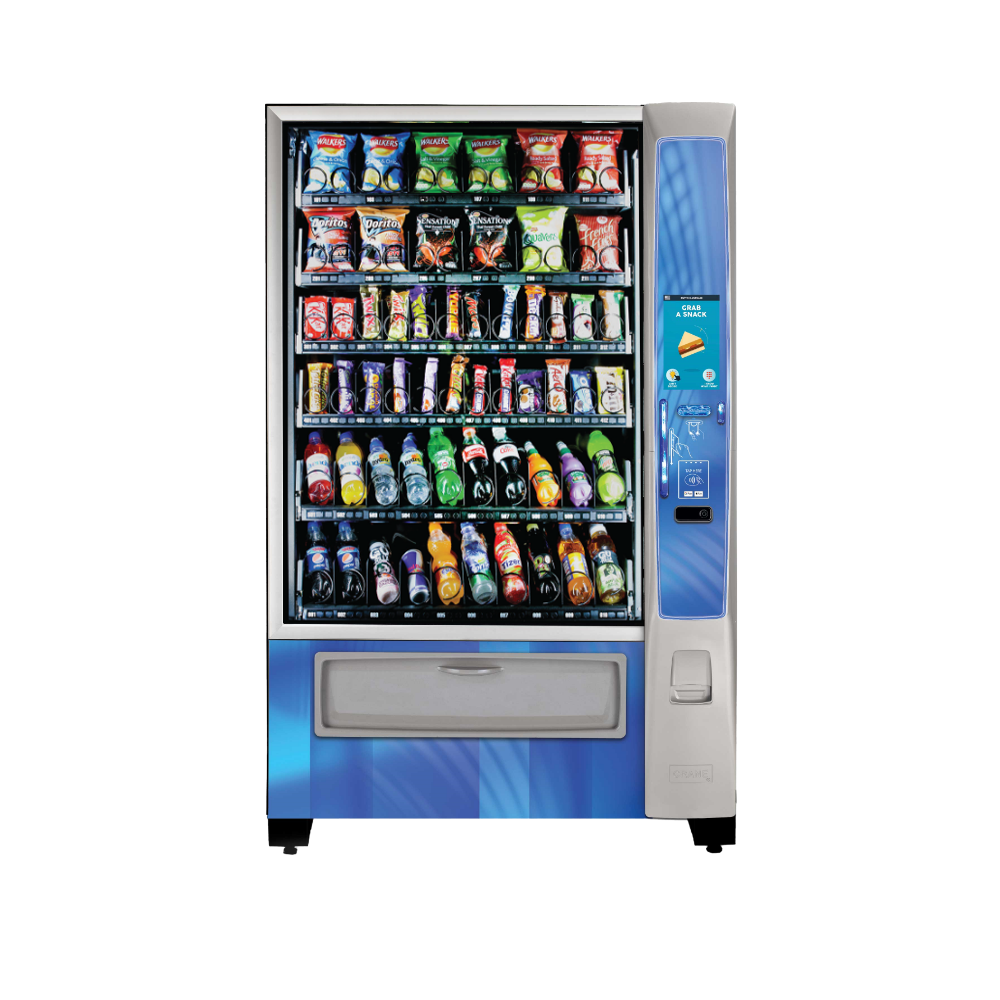
Merchant Combo MEDIA2
$2,595.00
Experience the future of vending with the Merchant Combo MEDIA2 — a cutting-edge machine designed to level up both the consumer experience and operational efficiency. This innovative vending machine combines state-of-the-art technology with interactive features to both drive sales and build lasting brand loyalty. With its advanced display and user-friendly interface, the Merchant Combo MEDIA2 redefines unattended retail, providing a seamless and engaging shopping experience for your customers.
The Complete Guide to the Merchant Combo MEDIA2
Table of Contents
-
Introduction: The Digital-First Vending Revolution
-
Overview & Core Philosophy of the MEDIA2
-
Technical Specifications & Hardware Architecture
-
The MEDIA2 Operating System & Software Ecosystem
-
Hardware Components: A Deep Dive
-
Software Features & Management Capabilities
-
Benefits for Vending Operators
-
Benefits for Location Hosts & Consumer Engagement
-
Target Markets & Strategic Deployment
-
Installation, Networking & Initial Setup
-
Product Programming, Pricing & Promotions
-
Daily Operations, Restocking & Data Management
-
System Maintenance & Proactive Care
-
Troubleshooting Common MEDIA2 Issues
-
Integration with Third-Party Systems & VMS
-
Cost Analysis, ROI & Total Cost of Ownership
-
The Future-Proof Nature of the MEDIA2 Platform
-
Frequently Asked Questions (FAQ)
-
Conclusion: The Intelligent Hub of Modern Vending
1. Introduction: The Digital-First Vending Revolution
The vending industry is undergoing a fundamental transformation, shifting from simple electromechanical transactions to integrated, data-driven retail experiences. At the forefront of this revolution is the Merchant Combo MEDIA2. This is not merely a vending machine; it is a comprehensive “Smart Vending” platform engineered by Crane Merchandising Systems to be the central nervous system of a modern operator’s route. The MEDIA2 transcends traditional machine categories by combining advanced payment processing, high-definition digital media, real-time telemetry, and sophisticated business intelligence into a single, unified controller that can manage a variety of accompanying food and beverage modules.
The name MEDIA2 itself signifies its dual core functions: it is a media display powerhouse and a merchant transaction processor. It represents the second generation of this philosophy, building upon lessons learned to deliver unparalleled reliability and features. For operators looking to future-proof their business, increase revenue per machine, and streamline operations, the Merchant Combo MEDIA2 is not just an option—it is the strategic platform for growth. This guide from VendingMachines.com will dissect every aspect of the MEDIA2, providing operators, technicians, and industry professionals with the knowledge required to leverage its full potential.
2. Overview & Core Philosophy of the MEDIA2
The Merchant Combo MEDIA2 is best understood as a high-performance computer and payment terminal housed in a ruggedized enclosure, designed to attach to Crane’s Combo machines (like the Nutrivene or Hot Food units) or operate as a standalone controller for other compatible vendors. Its core philosophy is based on three pillars:
-
Enhanced Consumer Engagement: Replace static decals and simple LEDs with a vibrant, full-color touchscreen capable of displaying high-resolution product images, nutritional information, video advertisements, and interactive content. This turns a utilitarian transaction into a branded retail experience.
-
Unified Operational Control: Consolidate machine management—payment processing, sales data, inventory tracking, machine diagnostics, and pricing—into a single, cloud-connected device. Eliminate the need for separate card readers, DEX dongles, and diagnostic tools.
-
Data-Driven Decision Making: Provide operators with a firehose of real-time and historical data, enabling hyper-efficient route planning, dynamic pricing, and scientifically optimized product mixes.
The MEDIA2 is the brain that makes a vending machine “smart.” It is the interface through which the consumer shops, the operator manages, and the machine reports its health.
3. Technical Specifications & Hardware Architecture
The Merchant Combo MEDIA2 is built with commercial-grade, reliable components designed for 24/7 operation in diverse environments.
Core Hardware Specifications:
-
Processor: Industrial-grade ARM or x86-based CPU.
-
Memory: Integrated RAM and flash storage for operating system, software, and data logging.
-
Display: High-brightness, sunlight-readable TFT LCD touchscreen, typically 15-19 inches in size. It is often multi-touch capable and protected by ruggedized, vandal-resistant glass.
-
Connectivity:
-
Ethernet: Gigabit port for high-speed, reliable wired network connection.
-
Wi-Fi: Dual-band (2.4GHz & 5GHz) 802.11 a/b/g/n/ac for wireless deployment.
-
Cellular: Integrated 4G LTE (and future-proofed for 5G) modem with a dedicated SIM card for primary or failover connectivity. This ensures the machine is always online.
-
Bluetooth: For peripheral pairing (e.g., handheld printers for receipts) and service tools.
-
-
Payment Processing:
-
Cashless: Integrated, PCI-PTS certified card reader supporting EMV chip, NFC (Apple Pay, Google Pay, contactless cards), and magnetic stripe.
-
Cash: MDB vending bus connectivity to control external, high-capacity bill validators and coin mechs.
-
-
I/O & Expansion: USB ports, serial ports (for legacy equipment), and dedicated connectors for controlling the attached vending machine’s motors, sensors, and refrigeration.
-
Power: 12V-24V DC input, typically powered by the host machine’s system. Designed for low energy consumption.
-
Environmental Rating: Engineered to operate in a wide temperature range and withstand typical break-room conditions.
Architecture: The MEDIA2 operates as the master controller. It communicates with the vending machine’s mechanical systems (via MDB or Crane’s proprietary bus), processes all payments through its secure modules, handles the user interface on its screen, and transmits all data to the cloud via its chosen network connection.
4. The MEDIA2 Operating System & Software Ecosystem
The hardware is powerful, but the software is where the Merchant Combo MEDIA2 truly shines. It runs a stable, Linux-based operating system optimized for real-time control and networking.
Core Software Components:
-
Firmware (OS): The low-level software that manages the hardware, boot process, and core communication protocols. It is updated periodically by Crane to add features and improve security.
-
Vending Application Suite: This is the main software the consumer and operator see. It includes:
-
Attract Mode Loops: Full-motion video and graphics promoting products, specials, or location-specific advertisements.
-
Browse & Purchase Interface: A graphical menu where consumers tap product images, see details, and complete payment.
-
Diagnostic & Service Menu: A password-protected interface for route drivers and technicians to test functions, load inventory, view logs, and configure settings.
-
-
Crane Merchant Cloud (or Compatible VMS): The MEDIA2 is designed to sync seamlessly with Crane’s cloud-based management platform or integrate with leading third-party Vending Management Software (VMS) like Cantaloupe, Nayax, or 365 Retail Markets. This cloud connection is the source of remote management and the repository for all data.
5. Hardware Components: A Deep Dive
A. The Touchscreen Display:
-
Function: Primary consumer and operator interface. Displays marketing media and the product catalog.
-
Key Feature: High brightness (nits) to combat glare from sunlight or overhead lights. Optical bonding reduces internal reflection for better clarity.
B. The Payment Module:
-
Integrated Card Reader: A fully certified, encrypted card reader built into the bezel of the device. It handles the entire transaction securely, tokenizing card data before it ever touches the vending machine’s main system.
-
Cash Interface: While the MEDIA2 doesn’t hold cash, its MDB controller manages external cash devices, providing a unified payment report that combines cash and cashless sales.
C. The Communication Hub:
-
Multi-Network Management: The device intelligently selects the best available network. e.g., It will prefer a stable, high-bandwidth Wi-Fi connection but will fail over seamlessly to cellular if Wi-Fi drops. This guarantees constant uptime for transactions and data reporting.
D. The Machine Controller:
-
Vending Bus Master: It sends precise commands to vend motors, checks sensor status (like column sold-out switches), and monitors machine health (temperatures, door switches, power events).
6. Software Features & Management Capabilities
This is the operational heart of the Merchant Combo MEDIA2. Its software capabilities are vast:
-
Remote Management & Monitoring (The “Killer App”):
-
Real-Time Sales Dashboard: See sales as they happen, from anywhere. View by machine, product, or payment type.
-
Inventory Alerts: Set par levels. Receive automatic notifications (email, SMS, app alert) when a product is running low or sold out.
-
Machine Health Alerts: Get instant notifications for critical events: temperature excursions in a cooler, power failure, door left ajar, or component failure.
-
Remote Price Changes: Update the price of a single product or all products across an entire fleet of machines from your office desk. React to cost changes or run promotions instantly.
-
Remote Content Updates: Push new marketing videos, seasonal graphics, or updated nutritional info to the screen without visiting the machine.
-
-
Advanced Consumer Features:
-
Interactive Product Catalogs: Search, filter by category (e.g., “Gluten-Free,” “Under 200 Calories”), and view detailed ingredient/nutrition panels.
-
Promotions & Upselling: “Buy a sandwich, get a drink for $1 off!” The system can manage complex bundled offers.
-
Loyalty & Mobile Integration: Support for QR code-based loyalty programs or direct integration with mobile apps for pre-ordering and pickup.
-
-
Operational Reporting:
-
DEX Data on Steroids: Go beyond standard DEX. Get profit margins per SKU, consumer engagement metrics (what products are viewed vs. purchased), and payment preference analytics.
-
Route Optimization Reports: The software can analyze sales velocity and suggest the most efficient service schedule and pre-kit list for each machine.
-
7. Benefits for Vending Operators
The ROI on a Merchant Combo MEDIA2 is realized through both revenue growth and cost reduction.
-
Significant Sales Increase (20-50%): Driven by the “digital shelf” effect—better merchandising, upselling, and the ability to accept all forms of cashless payment.
-
Dramatic Reduction in Route Costs:
-
Eliminate Unnecessary Stops: Only visit a machine when the data says you need to (low inventory, fault alert). No more “check-up” visits.
-
Perfect Pre-Kitting: Arrive with exactly the right products and quantities, reducing waste and truck stock.
-
Faster Service: The intuitive touchscreen interface makes loading new product data and running diagnostics quicker than using old keypads.
-
-
Improved Cash Flow & Security: Cashless settlements are automated and deposited quickly. Reduced cash on route improves safety.
-
Future-Proof Investment: The platform is software-upgradable. New payment methods (e.g., cryptocurrency) or consumer features can be added via remote updates, protecting your capital investment.
-
Powerful Sales Tool for Locations: Use the data and visual appeal of the MEDIA2 to win new high-value locations and negotiate better commission rates. Show prospective clients real-time dashboards of their machine’s performance.
8. Benefits for Location Hosts & Consumer Engagement
-
Modern Amenity that Enhances Space: The vibrant screen and sleek design elevate the break room or lobby, aligning with a company’s modern brand image.
-
Improved Employee/Visitor Satisfaction: A wider, more visible product selection and frictionless payment lead to a positive experience.
-
Potential for Revenue Sharing from Ads: The media screen can be used to display corporate communications, event announcements, or third-party advertisements, potentially creating a new revenue stream for the location.
-
Transparency & Data for Hosts: Operators can share anonymized sales reports, demonstrating the service’s value and helping the location understand consumption patterns.
9. Target Markets & Strategic Deployment
The Merchant Combo MEDIA2 is a premium solution for premium environments. Ideal deployment locations include:
-
Corporate Tech Campuses & Headquarters: Where a tech-savvy workforce expects digital interactions.
-
Modern Universities & Colleges: Student unions, libraries, and new dormitories.
-
Hospitals & Medical Centers: For staff and visitors in main cafeterias. The ability to display detailed nutritional info is a plus.
-
Airports & Transportation Hubs: High-traffic, high-impulse environments where advertising revenue is also key.
-
Fitness Centers & High-End Apartment Buildings.
-
Any Location Where You Need to Command a High Price Point or Win a Competitive Bid.
Strategic Insight: Deploy MEDIA2 units first in your best, most visible locations. The data and efficiency gains from these machines can subsidize and inform the management of your broader, traditional fleet.:::Merchant Combo MEDIA2
10. Installation, Networking & Initial Setup
Installation is more akin to setting up a network appliance than a traditional vending machine.
Physical Installation:
-
The MEDIA2 controller is securely mounted to the combo machine’s frame, with cables routed neatly to power, the vending machine’s control board, and any external payment peripherals.
-
Network Configuration – Critical Step:
-
Wired (Preferred): Connect the Ethernet cable to a live port on the location’s network. You may need to coordinate with the location’s IT department to get an IP address or ensure the port is active.
-
Wi-Fi: Use the touchscreen to select the location’s SSID and enter the password. Ensure signal strength is excellent.
-
Cellular: Insert the activated SIM card. The modem will typically connect automatically.
-
Initial Software Setup (Provisioning):
-
Power On & Self-Test: The unit will boot and run hardware diagnostics.
-
Cloud Registration: Using a serial number or QR code, the machine is “claimed” in the operator’s cloud management portal (e.g., Crane Merchant Cloud). This links the physical machine to your account.
-
Configuration Push: From the cloud portal, you push the initial configuration to the machine: time zone, currency, payment parameters, and base product file.
-
Machine Calibration: Follow on-screen prompts to calibrate the touchscreen and test the connection to the vending mechanism (e.g., test each motor column).::Merchant Combo MEDIA2
11. Product Programming, Pricing & Promotions
Programming is done remotely via the web portal, a paradigm shift from manual keypad entry.
-
Building a Product Catalog: In the cloud software, you create a master list of products with names, images, categories, and cost.
-
Assigning to Machines: Drag and drop products from your catalog onto a visual map of the machine’s columns/shelves on the MEDIA2.
-
Dynamic Pricing: Set prices individually or by category. Create promotional pricing with start and end dates (e.g., “Summer Special: All drinks $1.50 from June 1-August 31”).
-
Bundling: Create “meal deal” bundles. When a customer selects the sandwich, the screen can automatically suggest the bundled drink at a discount.::Merchant Combo MEDIA2
12. Daily Operations, Restocking & Data Management
The Data-Driven Route Driver:
-
Pre-Visit: The night before, the driver checks the portal or mobile app. The system provides a definitive service list for each machine: which columns are empty/low, any fault codes, and the cash collection amount.
-
On-Site: The driver uses their unique login on the MEDIA2 touchscreen to enter “Service Mode.” They can:
-
Acknowledge and clear fault alerts.
-
Perform a cash collection count (which logs electronically).
-
Input the restock quantities for each column they fill. The MEDIA2 updates its live inventory count instantly.
-
-
Post-Visit: The machine automatically reconciles the restock data with sales data. The cloud portal updates, reflecting the new starting inventory and the collected cash. This closed-loop system eliminates guesswork and shrinkage.::Merchant Combo MEDIA2
13. System Maintenance & Proactive Care
-
Software Updates: The system will notify the operator when a firmware or software update is available. These are typically installed remotely overnight with no service visit required.
-
Screen Cleaning: Regularly clean the touchscreen with a soft, damp microfiber cloth. Avoid harsh chemicals.
-
Physical Inspection: Check cable connections during service visits for any wear or looseness.
-
Proactive Monitoring: The operator’s main job is to monitor the cloud dashboard daily, responding to alerts rather than physically checking machines.
14. Troubleshooting Common MEDIA2 Issues
-
“No Network Connection” Alert:
-
Cause: Wi-Fi password changed, Ethernet cable unplugged, or cellular signal lost.
-
Fix: Re-check physical connections. Re-configure Wi-Fi. If cellular, ensure the SIM/data plan is active. The machine can often store transactions and sync when connectivity is restored.
-
-
Touchscreen is Unresponsive or Inaccurate:
-
Cause: Screen needs calibration or is damaged.
-
Fix: Re-run the touchscreen calibration utility in the service menu. If physically damaged, the display assembly may need replacement.::Merchant Combo MEDIA2
-
-
Card Reader Declines Valid Cards:
-
Cause: Payment processor issue, reader firmware glitch, or network problem preventing authorization.
-
Fix: First, ensure network connectivity. Try a different card. Reboot the MEDIA2 unit. If persists, contact your payment processor or Crane support.
-
-
Machine Mechanism Not Responding to MEDIA2 Commands:
-
Cause: Loose cable between MEDIA2 and the machine’s main board, or a failure in the machine’s internal controller.
-
Fix: Power down, check and reseat all interconnecting cables. Use the MEDIA2’s diagnostic tools to test output signals.
-
15. Integration with Third-Party Systems & VMS
While designed for Crane’s ecosystem, the Merchant Combo MEDIA2 is built on open standards.
-
VMS Integration: It can output data in standard formats (DEX, JSON APIs) to integrate with virtually any major Vending Management Software, allowing operators to keep their preferred back-office system.
-
Payment Processors: Though it has an integrated reader, it can be configured to work with alternative cashless providers if required by an operator’s existing contracts.
16. Cost Analysis, ROI & Total Cost of Ownership
The Merchant Combo MEDIA2 is a capital investment with a clear operational payback.
Sample Investment (on a new combo machine):
-
Premium for MEDIA2 vs. standard controller: $2,500 – $4,000
-
Ongoing Cellular Data Plan: $10 – $20/month
Merchant Combo MEDIA2
Merchant Combo MEDIA2
Merchant Combo MEDIA2
ROI Justification:
-
Revenue Lift: On a $500/week machine, a 30% sales increase = +$150/week.
-
Cost Savings: Eliminating 1 unnecessary service visit per month saves ~$75 in labor/fuel. Better pre-kitting saves 5% in product waste = $25/week.
-
Weekly Net Benefit: ~$250.
-
Payback Period on Premium: $3,500 / $250 = 14 weeks.
-
Ongoing Annual Profit Increase: $13,000+ per machine.
The Total Cost of Ownership is favorable because it drastically reduces variable operational costs (labor, fuel, product waste) while increasing the top-line revenue.
17. The Future-Proof Nature of the MEDIA2 Platform
This is a critical advantage. The MEDIA2 is designed for software updates. Future trends like:
-
AI-Powered Product Recommendations: (“Customers who bought this also liked…”).
-
Dynamic Demand Pricing: Adjusting prices based on time of day or inventory levels.
-
Enhanced Security Protocols: New encryption standards.
-
New Payment Methods: Can be added via remote software updates, protecting the hardware investment for a decade or more.::Merchant Combo MEDIA2
18. Frequently Asked Questions (FAQ)
Q: Can I retrofit a MEDIA2 onto my older Crane combo machine?
A: In many cases, yes. Crane offers retrofit kits for compatible older models (like certain Nutrivene machines). A technical assessment is required to confirm compatibility with the machine’s internal wiring and mechanics.
Q: What happens if the screen breaks? Is it very expensive to replace?
A: While the screen is a high-quality component, it is designed to be replaceable as a unit. The cost is significant (several hundred dollars) but is a straightforward swap compared to the value of the machine’s continued operation. Vandal-resistant screen protectors are a recommended add-on for high-risk locations.::Merchant Combo MEDIA2
Q: Who owns the data?
A: The vending operator owns the sales and operational data from their machines. The cloud service provider (e.g., Crane) acts as a custodian. Always review the service agreement.
Q: Is there a monthly subscription fee for the software?
A: Typically, yes. Access to the advanced cloud management platform, ongoing software updates, and sometimes cellular connectivity are bundled into a monthly Software-as-a-Service (SaaS) fee. This is separate from any payment processing fees.
Q: How secure is the MEDIA2 from hacking?
A: It is built to stringent PCI-PTS security standards for payment hardware. The software is regularly updated to patch vulnerabilities. It is far more secure than older machines with no encryption or standard MDB readers.
19. Conclusion: The Intelligent Hub of Modern Vending
The Merchant Combo MEDIA2 is more than a component; it is a strategic operating system for the future of vending. It decisively solves the industry’s core challenges: driving consumer engagement, capturing operational data, and eliminating wasteful manual processes. For the operator, it transforms the role from a reactive repair-and-fill technician to a proactive, data-driven retail manager.
Investing in the MEDIA2 platform is an investment in scalability, intelligence, and resilience. It allows an operation to do more with less, to understand their business in real-time, and to offer a consumer experience that rivals modern retail. In an increasingly competitive and technologically advanced market, the Merchant Combo MEDIA2 is not just a tool for success—it is the foundational platform upon which the next generation of profitable vending businesses will be built. It represents the clear path forward, turning every vending machine into a connected, intelligent, and highly profitable point of sale.
5 reviews for Merchant Combo MEDIA2
Add a review
Related products
Refurbished Machine
Refurbished Machine
Refurbished Machine
Jordan Lee –
“The ultimate all-in-one amenity for a modern workspace.”
We needed a single machine that could handle both snacks and cold drinks while fitting our tech-forward brand. The Merchant Combo MEDIA2 is perfect. The full-color media screen lets us display campus news and promotions, turning a transaction into an engagement. The combo format saves space and the selection is fantastic. It’s reliable, sleek, and feels premium.
Marcus Thorne –
“A concession stand in a single box. Drives impulse buys.”
Placing these in our theater lobbies has been a game-changer. The media screen runs trailers and combo deals, which really upsells customers in line. Having drinks and snacks in one unit reduces congestion at the main counter. It’s stylish, high-capacity, and has been rock-solid through our peak seasons.
Maria Elena, Administrator –
Our medical staff needed 24/7 access to both refreshments and snacks. This combo machine delivers. The media screen is useful for displaying shift updates and wellness tips. It’s consistently reliable. One star off because the drink column temperature needed a slight adjustment upon arrival (quickly resolved by their support). Otherwise, an excellent solution.
Marino the Boss –
“Feeds and hydrates my members without taking up extra space.”
Floor space is tight in my gym. This combo unit lets me offer protein bars, shakes, and cold drinks all in one footprint. The media screen is great for promoting class schedules. It’s built tough, cools drinks quickly, and handles constant use without a hiccup. A smart, high-value investment.
Chloe Rodriguez, Facility Coordinator – “The Apex” Corporate Plaza, Dallas, TX –
“Elevates our tenant amenities with smart, integrated service.”
We manage a large corporate property and needed a top-tier vending solution. The Merchant Combo MEDIA2 impressed us. The networking capability provides valuable usage data, and the media screen can show building announcements. It looks professional, offers great variety, and has required zero maintenance. Tenants love it.